Cloud subscription
We run it, and your staff use it in a web browser. The scribe also needs a speech service installed on each doctor’s computer.
For hospital teams
مریض سے، اس کی اپنی زبان میں With the patient, in their own language.
Six parts, described as they work today.
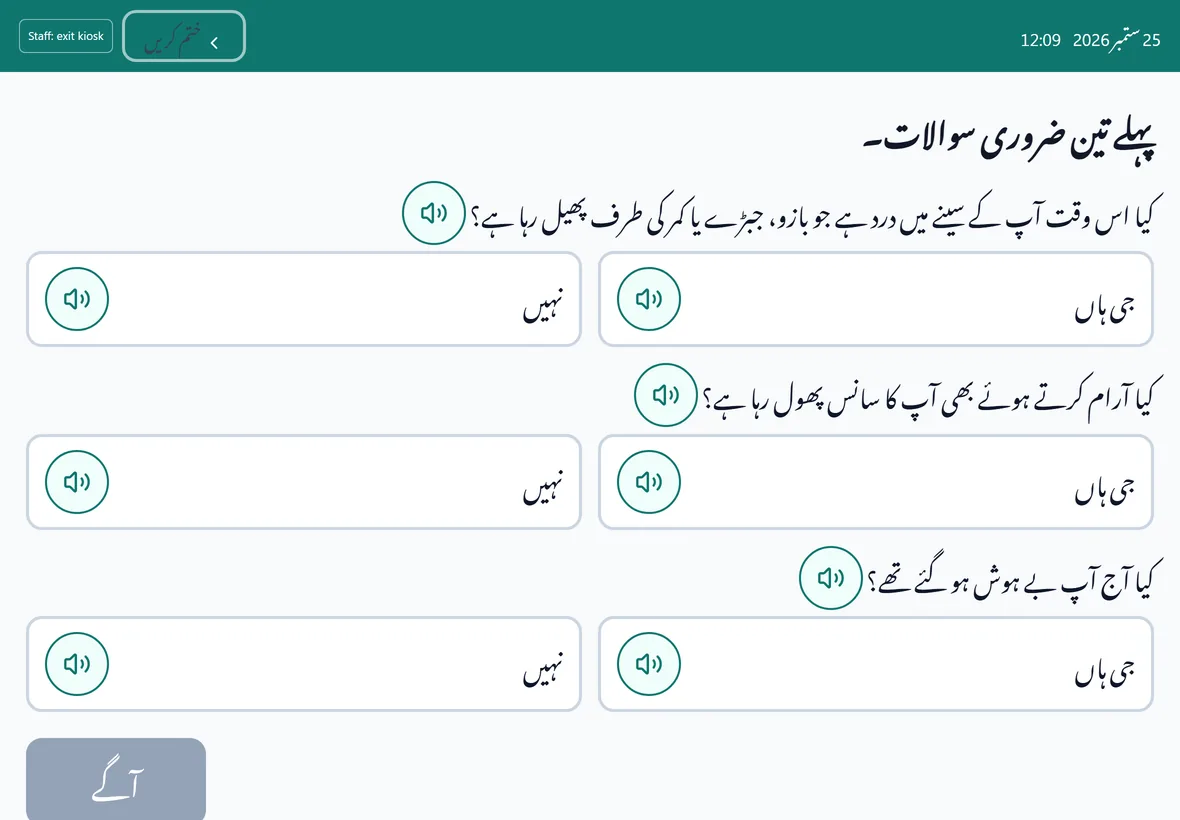
A check-in kiosk in Urdu for a front-desk tablet. Patients enter their file number and date of birth, the screen shows only their initials, and every prompt can be played aloud. Three emergency questions come first, and any “yes” sends the patient straight to the desk with an urgent slip. After the visit, the doctor can print a summary in Urdu from a signed prescription.
After confirming the patient’s consent on screen, the doctor records the consultation. A speech service on the doctor’s own computer turns the recording into text. The doctor can ask for a structured draft, edits each section, and nothing is saved until they press Save.
A result classed as critical becomes a task for a named clinician, due within the hour. Overdue tasks are marked, and an hour later they are flagged to the head of department. A laboratory page shows which critical limits are set and which a clinician has signed.
When a doctor prescribes or a nurse records a dose, the patient’s recorded allergies are checked, with brand names matched to their ingredients. In the standard setting, a confirmed conflict needs a written reason to override, and the override is recorded. Known interactions between medicines are shown as warnings, and the screen says plainly that it does not check related drug families.
One read-only screen for heads of department and administrators: patient census, bed occupancy by ward, early-warning score bands, patients not yet scored, and the critical-result queue. It refreshes every 30 seconds, and every number opens the list of patients behind it. If a source cannot be read, it says so rather than showing zero.
Each staff role has its own screens, and the database checks each role’s access as well. Every time a patient’s chart is opened, printed or sent, it is written to a log that cannot be edited or deleted, which hospital administrators can read. We can switch off the early-warning list and capacity alerts for a hospital, and observations are still recorded.
We run it, and your staff use it in a web browser. The scribe also needs a speech service installed on each doctor’s computer.
For hospitals whose systems must stay inside their own network. This edition is being built now; ask us where it stands.
Tell us about your hospital and what you would like to see.
Sending opens your own email app with the details filled in, addressed to adeel@zatesystems.com. This page stores nothing.
Prefer to look first? Try the guided demo.